How it works
From your customer's phone to yours
Your customers pay with MTN MoMo or Airtel Money. pawaPay processes the payment, RadiusOne checks it and credits your wallet, and you withdraw to your own number.
One payment, start to finish
What happens in the seconds after your customer taps Pay, and what happens when a step does not go through.
Hotspot package
- 14:02:05
Your customer picks a package
“1 day · UGX 1,000” on your hotspot page, then types their MTN or Airtel number.
UGX 1,000 - 14:02:06
A PIN prompt on their phone
The payment waits as pending while they approve it.
If: Declined, or the wrong PIN
No money is taken. The page says why, and they can try again.
- 14:02:31
They approve, pawaPay collects
pawaPay takes the payment from their mobile money account.
If: The confirmation is slow
The page keeps waiting, and nothing is credited until pawaPay confirms. A payment pawaPay never received is marked failed after 10 minutes.
- 14:02:33
RadiusOne checks with pawaPay
RadiusOne does not take a payment notice at its word. It asks pawaPay for the status itself, and keeps asking about a pending payment: after a minute, then less often, at least once an hour.
- 14:02:33
Code on their screen, money in your wallet
They get their code, and one tap on Connect this phone logs them in. In the same step your wallet gets one line for the sale.
+UGX 900UGX 1,000 less the 10% feeIf: They paid but closed the page
They open your hotspot page again and get the code back with the number they paid from and the transaction ID.
PPPoE invoice
- 09:14:50
Your customer opens the invoice
The payment link on invoice 000142, UGX 50,000 for the month, then their MTN or Airtel number.
UGX 50,000 - 09:14:52
A PIN prompt on their phone
The payment waits as pending while they approve it. An invoice has one payment waiting at a time.
If: Declined, or the wrong PIN
No money is taken. The page says why, and they can try again.
- 09:15:20
They approve, pawaPay collects
pawaPay takes the payment from their mobile money account.
If: The confirmation is slow
The page keeps waiting, and nothing is credited until pawaPay confirms. A payment pawaPay never received is marked failed after 10 minutes.
- 09:15:22
RadiusOne checks with pawaPay
RadiusOne does not take a payment notice at its word. It asks pawaPay for the status itself, and keeps asking about a pending payment: after a minute, then less often, at least once an hour.
- 09:15:22
Invoice paid, account back on
The invoice is marked paid. If the account was cut off for not paying, it is restored, and a customer who is online is moved back without being disconnected.
+UGX 47,000UGX 50,000 less the 6% feeIf: Several months unpaid
Each invoice is paid on its own, and the account stays cut off until what is owed is covered.
Your wallet
The wallet is the money RadiusOne holds for your ISP. Each line names the sale, invoice or withdrawal it came from. One example day:
| MoMoHotspot page · 1 dayUGX 1,000 less 10% fee | +UGX 900 | UGX 120,900 |
| MoMoHotspot page · 1 weekUGX 5,000 less 10% fee | +UGX 4,500 | UGX 125,400 |
| MoMoInvoice 000142 by MTNUGX 50,000 less 6% fee | +UGX 47,000 | UGX 172,400 |
| cashInvoice 000139 paid in cash2% fee on UGX 50,000 | −UGX 1,000 | UGX 171,400 |
| cashPrinted vouchers used today3% fee on 12 × UGX 1,000 | −UGX 360 | UGX 171,040 |
| cashAgent sales today3% fee on UGX 20,000 | −UGX 600 | UGX 170,440 |
| End of day | UGX 170,440 | |
Example figures at today's rates. Mobile money lines arrive less their fee. Cash goes to you directly, so only its fee is taken from the wallet. Printed voucher and agent fees are one line per day.
- Hotspot page sales and invoices paid by mobile money are credited less their fee, as soon as pawaPay confirms them.
- Printed vouchers, agent sales and cash invoices never pass through RadiusOne. Only their fee is taken from the wallet.
- If those fees take the wallet below zero, the next mobile money sales pay it back first.
- Once what you owe passes your limit, new voucher batches and agent sales are refused until it is back within it. Your hotspot page and invoices keep selling.
- You can top up with mobile money, up to what you owe.
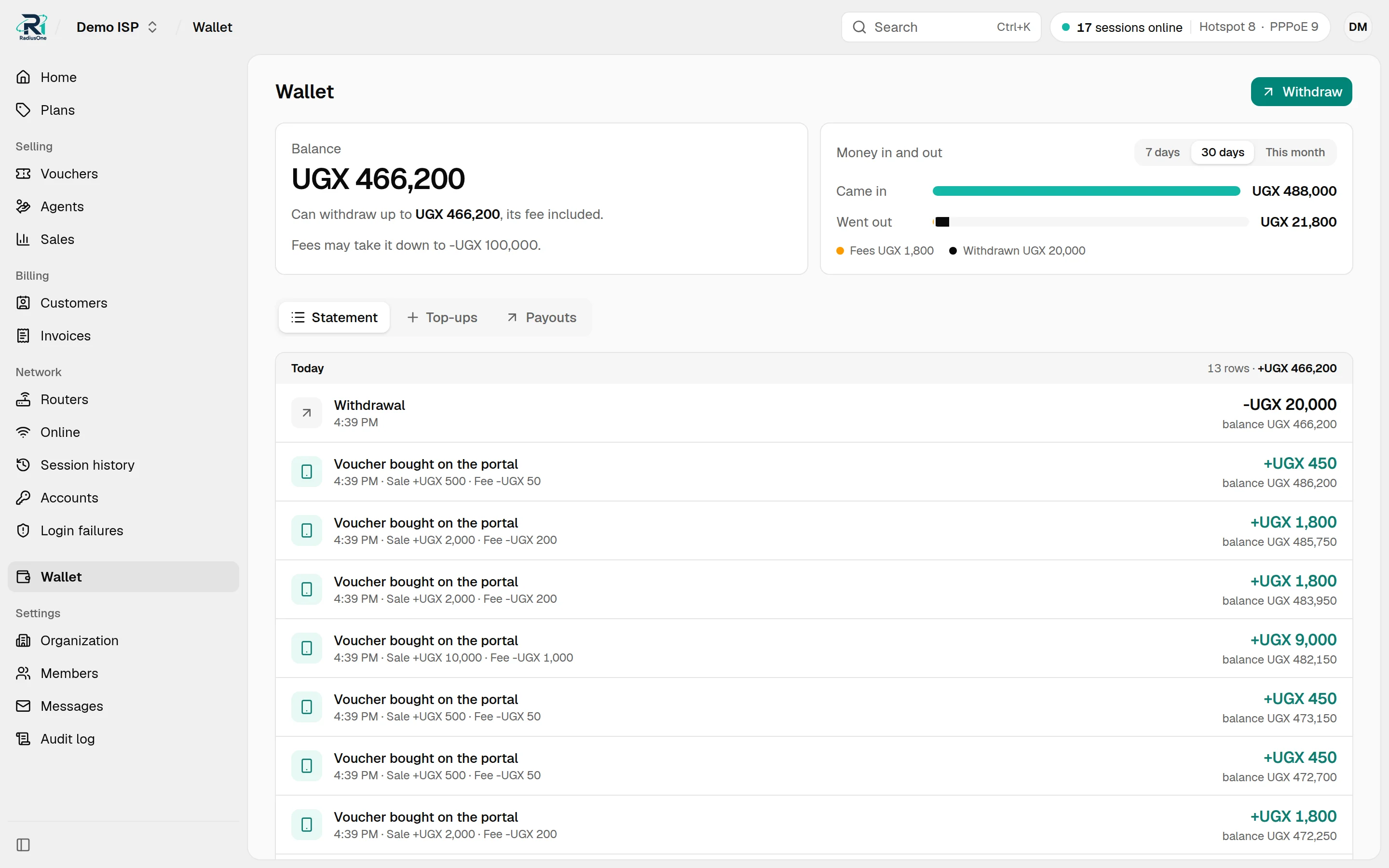
Withdrawals
Send your balance to your own mobile money number when you choose.
- 1
Verify your number once
Add the MTN or Airtel number you want to be paid on, with its owner's name. The RadiusOne team checks it once. Changing the number, operator or name needs a new check.
- 2
Withdraw
Choose the amount and confirm with your password. It is held from your wallet at once and sent to pawaPay, which pays your number.
UGX 150,000 → 0772 ··· 418 - 3
Paid or returned
When pawaPay confirms, the withdrawal shows as paid and the withdrawal charge, pawaPay's payout cost plus a small margin, is taken. If the payout fails, the money returns to your wallet and nothing is charged.
Withdrawals ask for an admin's password again and go only to a verified number. Technicians and agents cannot withdraw. Each withdrawal is a line in your wallet, and your audit log shows who asked for it.
Wallet balance is not money on your phone. It is money RadiusOne holds for you, and it is in your mobile money account once the withdrawal shows as paid.
Who handles the money
For ISPs, and for the payment partners who review us.
- Operated by Imara Systems Limited
RadiusOne is a product of Imara Systems Limited, Nalufenya B, 900043, Jinja, Uganda.
- Processed by pawaPay
Every mobile money payment and payout goes through pawaPay, to MTN and Airtel.
- Collected for the ISP
RadiusOne collects on behalf of the ISPs that use it and passes the money on to them, less the agreed fee.
- Nothing added to the price
Customers pay the package price only. RadiusOne adds no charge on top.
- Checked before it counts
A payment is credited only after RadiusOne has asked pawaPay for its status itself.
- Paid out to verified numbers
Withdrawals go only to a number, operator and owner's name that the RadiusOne team has verified.
Start with RadiusOne
We are onboarding a small number of ISPs in Uganda. Send us a WhatsApp message with your ISP name, whether you run hotspot, PPPoE or both, and your RouterOS version. We check that your setup is supported, agree your rates, and help you connect your first router.